On this page
Credentials
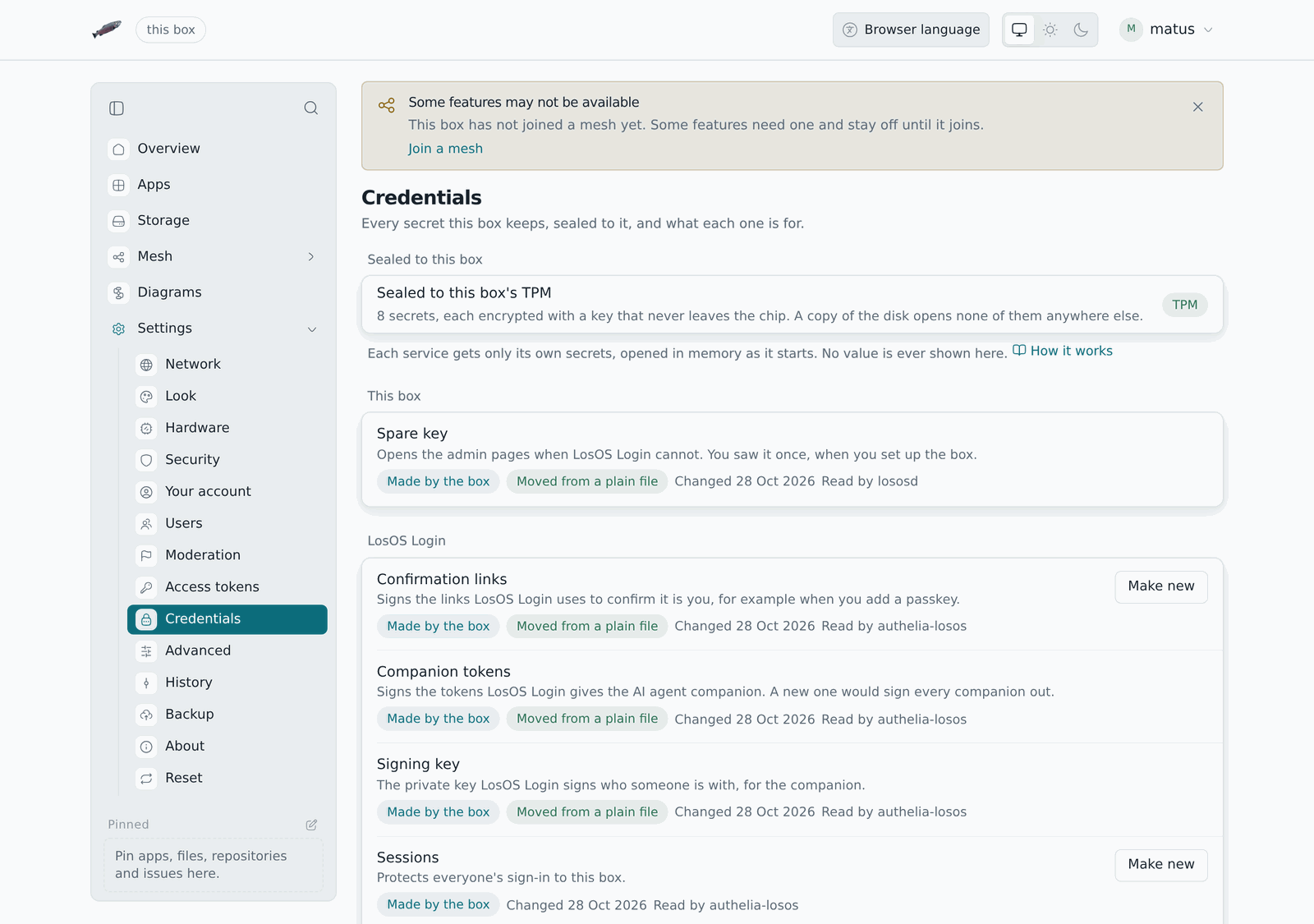
The box keeps a handful of secrets for itself: the spare key to the admin pages, the keys of LosOS Login, the secret LosOS Mail is opened with and the keys of your backup bucket. None of them is a plain file. Each one is a credential, encrypted and sealed to this box, and handed by the system only to the services that read it.
Settings → Credentials lists them. It shows what each one is for, what reads it, what it is sealed to and when it last changed. It never shows a value, and nothing on the page can reveal one.
Where they are kept
Each credential is one file in /etc/credstore.encrypted, encrypted with
systemd-creds. The directory is kept across reboots on the encrypted volume
(see What survives a reboot), and an erase
deletes it.
A file is sealed to one of two keys:
- The TPM, on a box that has one. The chip holds the key, so a copy of the file is useless anywhere else, and so is a copy of the whole disk. The seal is not bound to firmware measurements, for the reason the TPM page gives for the disk key: the box updates itself at night with nobody there to unlock it by hand.
- The box's own key,
/var/lib/systemd/credential.secret, readable by root only, on a box without a TPM. A copy of one file is still useless alone, but a copy of the whole volume carries the key with it.
The pane says which one this box uses.
Each file also carries its own name, checked when it is opened, so a file copied over another credential's is refused rather than used.
How a service gets one
When a service starts, systemd opens the credentials it is allowed and puts them in a directory of that service's own, on memory only. The service is told where to look and nothing else. When it stops, the directory is gone. No other service, and no person signed in to the box, can read it.
Making a new value
You can make some credentials new from the pane. Make new asks first, then the box makes a random value, seals it and restarts what reads it. A new session key for LosOS Login, for instance, signs everyone out.
The others cannot, and the pane says why:
- The spare key: you wrote it down when you set the box up, and a new one would leave you with a key that no longer works.
- LosOS Login's storage key: it encrypts everyone's second factors, and a new one would lose them.
- The keys LosOS Login gives the AI agent companion: a new one would sign every companion out.
- LosOS Mail's secret: the admin pages hold it from the moment they start. The secret the admin pages ask LosOS Login with is made again on its own whenever it needs to be.
- The bucket's keys: you type those on the Backup pane, which the Credentials pane links to.
From a terminal, losos credentials list shows the same list, and
losos credentials rotate <name> makes one new.
Boxes set up before
A box set up before the credential store kept these secrets as plain files
under /var/secrets. At the first boot with the store, it seals each value
as it is, so nothing that already uses it breaks, then overwrites the plain
file and deletes it. The pane marks each one it moved.
When a credential cannot be opened
If the TPM was cleared, or the box's own key was lost, a sealed file no longer opens. The box keeps the file aside, makes a new value, and the pane marks it as made again at boot. A spare key made again is not shown anywhere, so sign in with your password instead.
What it does not protect against
The store protects what is on the disk: a backup copy, a disk taken out of the box, a bug that lets a service read files it should not. It does not protect against root on the running box, which can ask the system to open any credential. The box has no shell and no SSH for that reason.