Secure Boot and signed media
Every release's installer ISO is signed, and a machine with Secure Boot on can verify it before a single byte of LosOS runs. This page says what the firmware verifies, how to let your firmware trust LosOS, and how to check a download by hand.
What is verified, and by whom
With Secure Boot on, UEFI firmware verifies one thing: the program it is
about to start, against the certificates in its db list. LosOS makes that
one check cover the whole boot:
- The firmware verifies the loader. The stick's UEFI loader,
EFI/BOOT/BOOTX64.EFI, is a single unified kernel image. It holds the Linux kernel, the initial ramdisk and the kernel command line in one file, signed with the LosOS certificate. A changed byte in any of the three breaks the signature, and the firmware refuses to start it. Nothing from the stick runs before this check. - The loader verifies the system. The rest of the stick is one 1.5 GB
system image,
nix-store.squashfs. Its SHA-256 hash is part of the signed command line, and the initial ramdisk hashes the image on the stick before mounting it. It refuses an altered image, shows THE MEDIUM HAS BEEN ALTERED on the screen and powers the machine off.

The installer then says what happened, with its firmware menu:
Secure Boot: enabled. The firmware verified this medium's signature.
or Secure Boot: disabled ... when the firmware checked nothing, or
Secure Boot: not available (legacy BIOS boot). Secure Boot is a UEFI
feature. Nothing verifies a stick booted in BIOS mode, the same as any other
BIOS boot.

What is not covered is the installed system. The box boots with systemd-boot from its own disk. Neither that loader nor the kernels its nightly rebuilds install are signed, so the box itself needs Secure Boot off to boot. Today the sequence is: enrol the certificate, boot the stick with Secure Boot on so the firmware verifies the medium, install, then turn Secure Boot off before the first boot from disk. Or leave it off throughout and verify the download by hand instead, as described below. Signing the installed system's boot chain would need a signing key on the box for every rebuild. That is a separate design and not part of this one.
Letting your firmware trust LosOS
A PC ships trusting Microsoft's certificates and nothing else, so with
Secure Boot on it refuses the LosOS stick. OVMF and most firmware print
Access Denied, and some skip the stick without a message. That refusal
means the signature check works. To boot the stick with Secure Boot on,
add the LosOS certificate to the firmware's db, next to Microsoft's:

- Get the certificate. It is on the stick itself at
EFI/losos/losos-secure-boot.cerin DER form and as.pem, and on every release aslosos-secure-boot-db.cer. The release notes print its SHA-256 fingerprint, andopenssl x509 -in losos-secure-boot-db.pem -noout -fingerprint -sha256prints the same for the file you have. - In the firmware's Secure Boot settings, switch from Standard to
Custom mode. Choose Append to db, Enroll key or Add signature
from file, and pick the
.cerfrom the stick's EFI partition. The wording differs by vendor. The stick's EFI partition is a plain FAT volume every firmware can browse. - Boot the stick. The installer's first line says Secure Boot: enabled.
Keep Microsoft's certificates
Add LosOS to the list. Don't replace the list with LosOS. Three things on a
normal PC are signed under Microsoft's certificates and stop booting the
moment those certificates leave db:
- Windows' own boot manager.
- Other Linux distributions, whose first-stage loader (shim) Microsoft signs.
- The firmware drivers on graphics and network cards, called option ROMs. On a desktop with a separate graphics card, losing these can mean no picture at all, including in the firmware's setup screen.
Avoid Delete all keys, Clear Secure Boot keys and Reset to Setup Mode unless the next step is Restore factory keys. If your firmware can only add a key after clearing them, restore the factory keys first and then append the LosOS certificate.
From a running Linux in Setup mode, efi-updatevar -a -c losos-secure-boot-db.pem db from efitools appends. With sbctl, pass
--microsoft: sbctl enroll-keys --microsoft keeps Microsoft's
certificates beside the ones sbctl enrols, and without the flag it drops
them. Then add the LosOS certificate to sbctl's db.
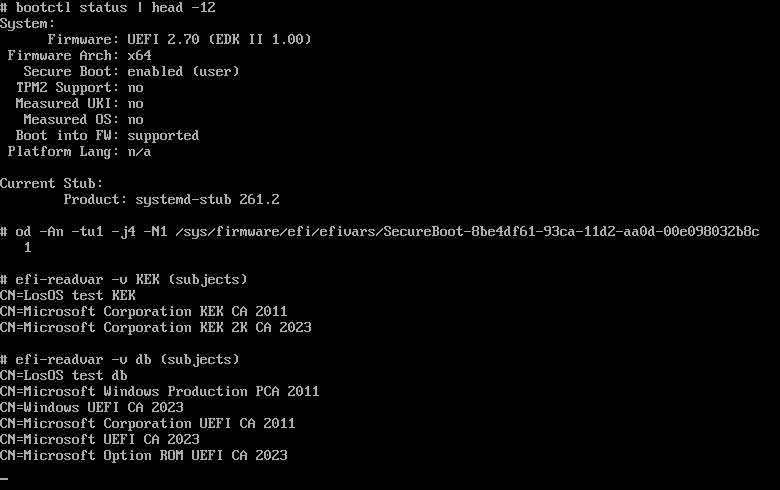
The test suite checks this exact state. Its firmware holds the LosOS
certificate and Microsoft's five db certificates and two KEK
certificates side by side. The LosOS stick boots, and so does Ubuntu's
Microsoft-signed shim. Take Microsoft's certificates away and the same
shim is refused:
Enrolment is a one-time change to that machine.
The LosOS loader is signed by LosOS, not by Microsoft. A stick that boots on a stock PC with nothing enrolled would need a shim that Microsoft signed for LosOS, after the public shim review and Microsoft's signing process, which LosOS has not been through. Until then, every machine enrols the LosOS certificate once.
Verifying a download by hand
Each release carries SHA256SUMS and a detached signature, SHA256SUMS.sig,
made with the same certificate that signs the medium:
R=https://github.com/dasmatus/losos/releases/download/<tag>
curl -fsSLO $R/SHA256SUMS $R/SHA256SUMS.sig $R/losos-secure-boot-db.pem
openssl dgst -sha256 -verify <(openssl x509 -pubkey -noout -in losos-secure-boot-db.pem) \
  -signature SHA256SUMS.sig SHA256SUMS
sha256sum -c --ignore-missing SHA256SUMS
The first command prints Verified OK. The second checks whichever of the
release's files you downloaded. To check the loader's signature inside an
ISO you already have, run the repository's tool on it in place:
nix run github:dasmatus/losos#losos-sign-iso -- verify --cert losos-secure-boot-db.pem losos-installer-<tag>.iso
Compare the certificate's fingerprint with the one in the release notes,
and with nix/keys/secure-boot-db.pem in the repository. All three are the same
file.
Where the key lives
The private key never enters a Nix build or a box. The owner makes it
once, on their own computer, with docs/provisioning/secure-boot/keygen.sh, and
keeps it offline. The only other copy is the repository secret CI signs
with. The certificate is committed as nix/keys/secure-boot-db.pem. Until that
file carries one, releases say Not signed and the stick needs Secure Boot
off. The test suite checks the mechanism with a throwaway key it generates
and discards. nix/tests/secure-boot.nix boots the signed medium under OVMF's
Secure Boot build and shows the firmware's own enabled flag from inside.
The firmware in that test holds Microsoft's certificates beside the test
key, and a Microsoft-signed shim still starts on it. It also watches the
firmware refuse the same medium under Microsoft-only keys, a tampered copy,
and the unsigned build, and refuse the shim once Microsoft's certificates
are gone.