LosOS Cloud
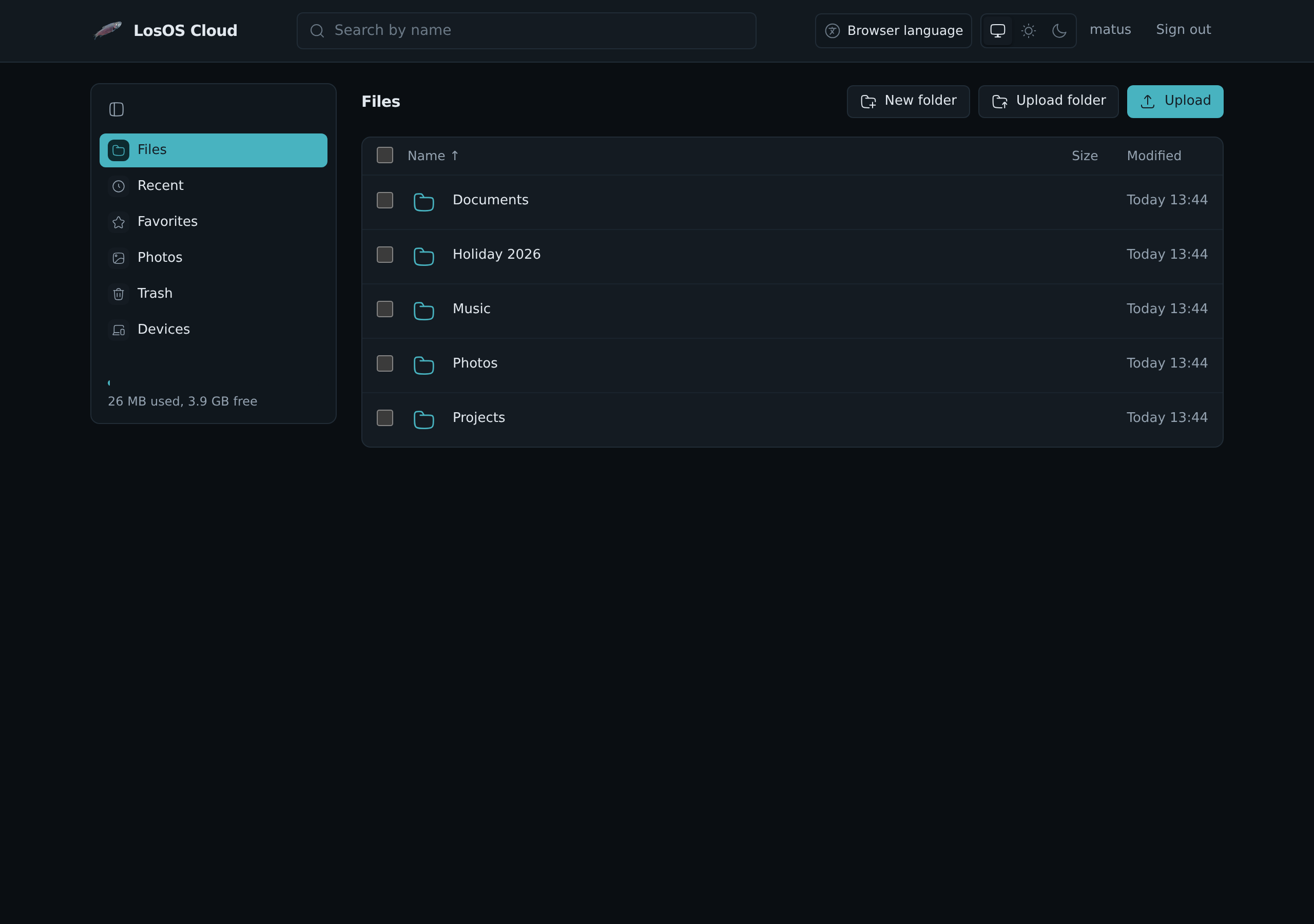
LosOS Cloud is the box's own file service: your files in a browser, a network folder for the file manager, a server the Nextcloud desktop and phone apps sync with, and your calendars and contacts for any calendar app.
Open it at https://<name>.local/cloud/. <name> is the box's name, as on
the box's screen. You sign in with LosOS Login, and everyone who can sign in
gets their own files. The person who set up the box gets the owner's.
In the browser
- Files lists your folders. Drop files or whole folders on the page to upload them, or use Upload. Tick files to download, rename, move, copy or delete them, or to see their earlier versions.
- Recent shows what changed lately, Favorites what you starred.
- Photos shows every picture, newest month first. Click one to see it large and use the arrow keys to go through them.
- Trash keeps deleted files for 30 days, or as long as the Apps pane says. Restore one, or delete it for good. Files deleted through the network share skip it.
- Devices lists the computers and phones that sync, and signs one out.
- The search field at the top finds files by name.
- Text files open in an editor several people can type in at once, and Shared with you holds what people on other boxes shared with you. See Sharing and editing together.
- Notes reads a folder of Markdown notes the way Obsidian does, with links, tags and a graph, and can publish one as a knowledge base. See Notes and knowledge bases.
- Right-click a file, a folder or the space around them for what you can do there; see the right-click menu.
- A file's right-click menu also hands it to the other apps: Send by mail and Send in chat while the box has Mail and Chat, and Ask AI about this for a text file on a box that runs a language model. The AI runs on the box and reads only the file you picked.
Desktop and phone apps
The Nextcloud desktop client and the Nextcloud apps for Android and iOS work with LosOS Cloud. Give them the box's address without a path:
https://<name>.local
The app opens LosOS Login in a browser. Sign in, press Allow on the page that follows, and the app gets a password of its own. It then shows up under Devices, where you can sign it out without touching your LosOS Login password.
Calendars and contacts
Calendar and contact apps (Thunderbird, GNOME Calendar, DAVx⁵ on Android, the iPhone's own accounts) find your calendars and address books from the box's address:
https://<name>.local
Sign in with your LosOS Login name and an app password from the desktop or
phone app's sign-in, or, on the box's network, with your LosOS Login
password. A calendar app that asks for the full address takes
https://<name>.local/remote.php/dav/.
In the browser, the same calendars are in Calendar, and the address books in Contacts.
In the file manager
The same files are a WebDAV share at this address:
https://<name>.local/remote.php/webdav/
On the box's network, GNOME Files and Dolphin list it under the network as
LosOS Cloud on <name>. Windows and macOS add it by address, as in
Files on your computer. Install the box's certificate first, as in
first run, step 1.
On the box's network the share takes your LosOS Login name and password. Through the internet it takes only an app's own password, so use the desktop or phone app there.
A box that ran Nextcloud
Before LosOS Cloud, a box kept your files in Nextcloud. On the first start
without it, the box moves everything over by itself, before LosOS Cloud
opens: every account's files with their trash, calendars, contacts and
tasks, Deck's boards, and the passwords the desktop and phone apps already
had, so they keep syncing without a new sign-in. Apps set up with the old
address ending in /nextcloud keep working too.
The files are moved, not copied, so the move needs no extra space. What Nextcloud kept beside them stays where it was; only an erase clears it, with everything else. If the move fails, LosOS Cloud does not open on an empty folder: the box tries again on the next start.
Settings
The Apps pane's LosOS Cloud fold sets how long the trash keeps files
(losos.cloud.trashDays, 1 to 365 days). losos.cloud.enable on the
Advanced pane turns LosOS Cloud off.