Mesh CI
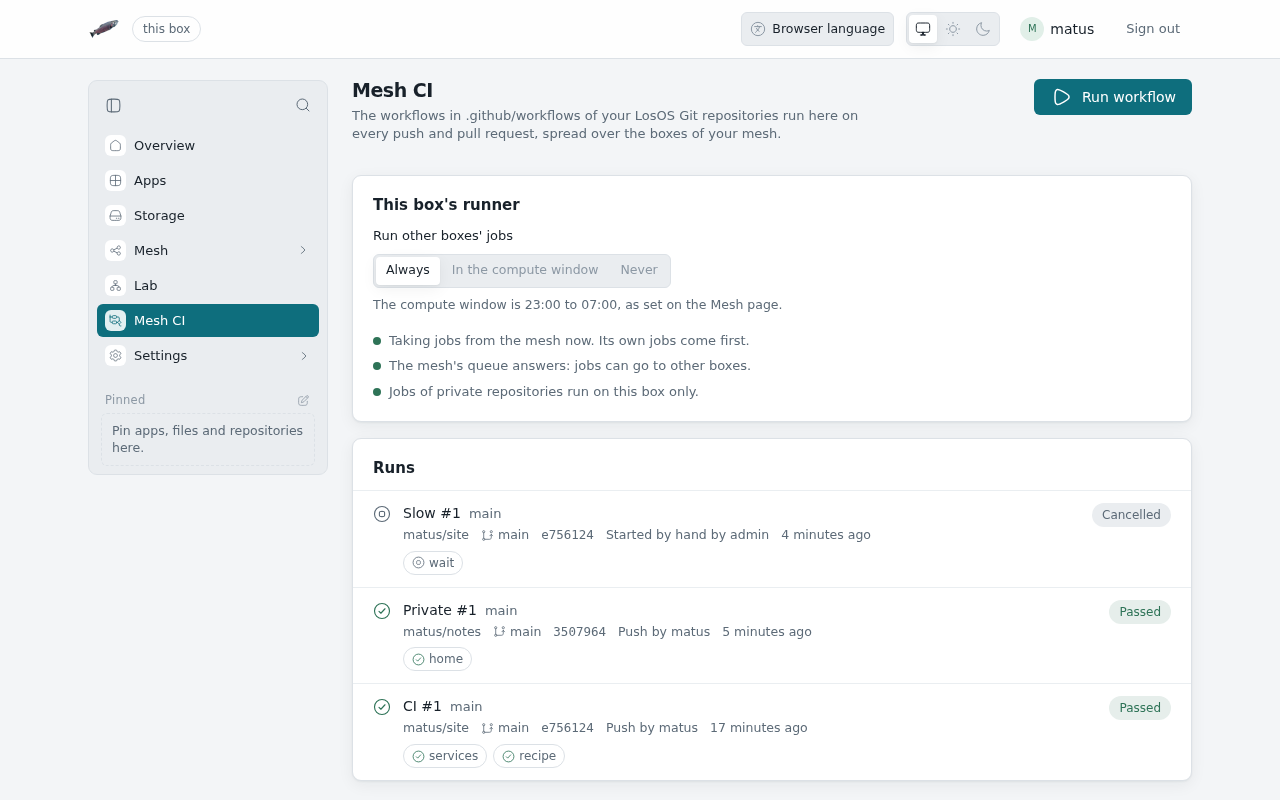
Mesh CI runs the GitHub Actions workflows in your
LosOS Git repositories. A push or a pull request starts the
workflows in the commit's .github/workflows/ folder, the boxes of your
mesh share out the jobs, and each job's result shows on the commit and in
the pull request's checks. Mesh CI in the sidebar opens it at /ci.
When Mesh CI is there
Mesh CI exists only while the box shares its storage with a mesh it has joined (see storage modes). With sharing off, or outside a mesh, there is no Mesh CI in the sidebar and no workflow runs. The runs already made stay on the disk and come back with it.
Runs
The page lists the newest runs first: the workflow, its number, what started it (a push, a pull request, or Run workflow), the repository, the commit and how long it took. Open a run to see its jobs. Each job says where it ran: This box, or Mesh with the name of the box that took it. Pick a job to read its log, step by step, with each step's exit code and the job's outputs.
Cancel run stops a run's jobs, and their containers are removed. Run again starts the same workflows on the same commit.
Run workflow starts a workflow that has workflow_dispatch among its
triggers. Give the repository as owner/name, a branch (the default branch
if you leave it empty), press Find workflows and pick one.
Where a job runs
A job goes to the mesh, where any box that lends its runner may take it, except when:
- its
runs-onnamesself-hosted; - its repository is private, unless
losos.ci.privateOnMeshis on. Another box would see the code; - the box has no edge in reach.
Then it runs on this box.
Lending this box's runner
Run other boxes' jobs under This box's runner decides when this box takes jobs from the rest of the mesh:
- Always;
- In the compute window, the hours set on the Mesh page (the default);
- Never. The box still runs its own jobs.
The box takes one job at a time. A job runs as the shared account in a
rootless container with no way into the box's own network or anything else
on the LAN. It gets at most losos.ci.runner.memory of memory (2 GB by
default) and losos.ci.runner.cpus of processor time (1.5 cores), at a low
priority, so the box's own work comes first.
What a workflow can use
Workflows are read as GitHub Actions workflows, so most of them run as they are:
on: push,pull_requestandworkflow_dispatch, with branch and tag filters;- jobs with
needs,if,strategy.matrix,outputs,env,defaultsandtimeout-minutes, and the${{ }}expressions; - steps with
run, and actions fromuses: JavaScript, composite and Docker actions from GitHub, actions in the repository (./path) anddocker://images; containerandservices. A service is reachable by its name and onlocalhost, and its health check passes before the steps start.
A job with no container runs in LosOS's own image: bash, the usual
command-line tools, git and curl. losos.ci.runner.images maps runs-on
labels to other images, such as ubuntu-latest=docker.io/library/ubuntu:24.04.
Some parts of GitHub Actions need GitHub's own services, and the log says so where they come up:
actions/checkoutdoes nothing: the commit's files are already in the workspace;actions/cache,upload-artifactanddownload-artifactkeep nothing;secretsis empty,schedulenever fires, and reusable workflows (jobs.<id>.uses) are refused.
Containers and pm
The box starts and stops every job's containers with
the pm package manager,
through Mesh CI's own pm plugin. The plugin is signed, and pm loads no
plugin that is not. It answers only for Mesh CI's containers, whose names
start with lci-, and refuses to run anything as root.
A step can also build a pm recipe with the losos-project/pm action:
- uses: losos-project/pm@v0
  id: pkg
  with:
    recipe: pkg/build.rhai
    trust: 3f0c…   # the hex public key the recipe is signed with
- run: ls -l ${{ steps.pkg.outputs.archive }}
pm builds the recipe in its own jail, in the job's workspace, and the archive
output is the package it made. The recipe must be signed by a key under
trust. command: explain says what the recipe would do without building
it, and permissive: true passes pm's --permissive.
Settings
On the Advanced pane:
losos.ci.enableturns Mesh CI off;losos.ci.privateOnMeshlets private repositories' jobs run on other boxes;losos.ci.runner.memory,losos.ci.runner.cpusandlosos.ci.runner.imagesare described above.